
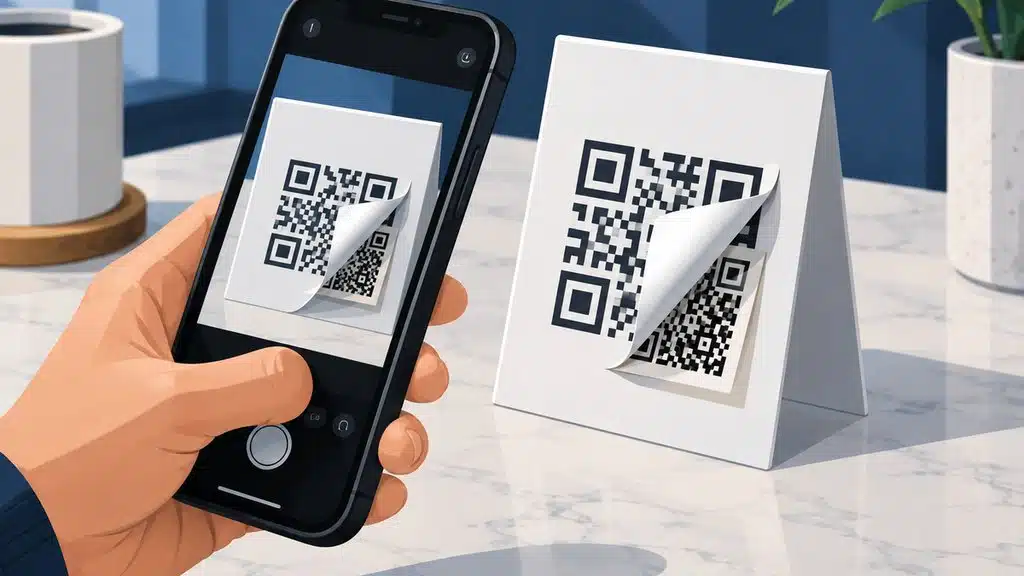
QR codes are everywhere in Prescott, AZ, from restaurant menus on Whiskey Row to parking payment signs near the courthouse plaza. Business owners and employees scan them dozens of times per week without a second thought, but that quick camera tap can open a door for cybercriminals if the code has been tampered with or maliciously generated.
This guide explains how QR code attacks actually work on iPhones, what the real risks look like for small businesses in Yavapai County, and the concrete steps you can take to protect your company devices. You will also find a practical checklist you can share with your team today.
Key Takeaways
- A malicious QR code cannot directly infect an iPhone, but it can redirect you to a phishing site, trigger a malicious profile download, or open a fraudulent payment portal.
- Quishing attacks, which use QR codes to deliver phishing links, grew significantly in 2023 and 2024 as attackers bypassed traditional email security filters.
- iPhones running current iOS versions include built-in protections like URL preview and sandboxing, but user awareness remains the most important defense layer.
- Business owners in Prescott should train employees to verify QR code placement, inspect URLs before tapping, and report suspicious codes immediately.
How QR Code Attacks Work on iPhones
A QR code is simply a two-dimensional barcode that stores text, most commonly a web address. When you point your iPhone camera at a code, iOS reads the embedded URL and offers to open it in Safari or another browser.
The code itself does not contain executable software, so it cannot directly install malware on your device the way a malicious app download might.
The danger lies in where the QR code sends you. Attackers create codes that link to phishing websites designed to steal Apple ID credentials, payment information, or business login details.
Some codes trigger calendar invites, prompt malicious configuration profile downloads, or open FaceTime or messaging apps with pre-filled attacker contacts.
In 2023, the FBI issued a public warning about criminals tampering with physical QR codes in public locations. Attackers place stickers over legitimate codes on parking meters, restaurant tables, and event posters, redirecting unsuspecting scanners to fraudulent payment sites.
The FBI noted that once funds are sent through these fraudulent portals, recovery is extremely difficult.
Apple’s iOS architecture provides meaningful protection. Safari runs websites in a sandboxed environment that limits access to the file system and other apps.
The operating system also warns users before downloading configuration profiles, which are required for many advanced attacks. However, these protections assume the user reads and heeds the warnings rather than tapping through them out of habit.
QR Code Safety Checklist for Prescott Business Owners
- ✓Verify QR code source before scanning: Check for stickers, overlays, or unexpected placement; confirm with staff when possible
- ✓Inspect URL preview on iPhone: Look for HTTPS, correct spelling, and matching domains before tapping
- ✓Avoid credential entry from QR codes: Close Safari and navigate directly to services through bookmarks or password manager
- ✓Report tampered codes immediately: Notify property owners and document suspicious codes with photographs
- ✓Keep iOS and business apps updated: Enable automatic updates and verify critical business apps are current
- ✓Use a password manager with phishing resistance: Password managers fill credentials only on matching domains for added verification
- ✓Train employees on quishing scenarios: Include QR code attacks in regular security awareness discussions
Share this checklist with your team and review it quarterly.

The Rise of Quishing and Real-World Attack Scenarios
Security researchers coined the term quishing to describe phishing attacks delivered through QR codes. These attacks gained traction because they bypass email security filters that scan for malicious links in message bodies.
A QR code embedded in an email or physical space carries the payload in an image format that many security tools do not analyze.
In one documented 2023 campaign, attackers sent phishing emails impersonating Microsoft security alerts. The emails contained QR codes that directed victims to fake Microsoft login pages designed to harvest credentials for corporate accounts.
Because the malicious link never appeared as clickable text, traditional email link protection failed to flag it.
Physical tampering remains equally common. Attackers print fraudulent QR code stickers and place them over legitimate codes on parking payment signs, electric vehicle charging stations, and public Wi-Fi access points.
A driver in a hurry to pay for parking in downtown Prescott might not notice the sticker overlay and unknowingly submits payment card details to a criminal server.
Businesses face amplified risk because a single compromised employee credential can grant attackers access to company email, cloud storage, or financial systems. The 2024 Verizon Data Breach Investigations Report found that 74% of all breaches involved the human element, including social engineering and credential theft.
Verizon DBIR (2024)
Restaurants and retail shops in Prescott that use QR codes for menus or loyalty programs should inspect their displayed codes regularly. A tampered code at your business location damages customer trust and can create liability if patron payment data is stolen.

What Happens When You Scan a Suspicious QR Code
When your iPhone camera detects a QR code, iOS displays a notification banner showing the embedded URL before opening it. This preview is your first and most important defense.
A legitimate business URL should match the expected domain. A suspicious URL might use misspelled brand names, extra subdomains, or entirely unrelated domains.
If you tap through to a malicious website, several outcomes are possible. The site might present a fake login page for Apple ID, Microsoft 365, or a banking service.
It might prompt you to download an app outside the App Store, which iOS blocks by default but users can override. Some sites attempt to exploit outdated browser vulnerabilities, though this is less common on current iOS versions.
Configuration profile attacks represent a more serious threat on iPhones. A malicious website can prompt you to download and install a profile that grants attacker-controlled certificates, VPN settings, or email accounts.
iOS requires explicit user confirmation through multiple dialog boxes, but social engineering can pressure users into approving these installations.
Payment redirection is another common outcome. The fraudulent site might mimic a legitimate payment processor and request credit card or banking details.
Because iOS Safari does not have universal payment fraud detection, the user must recognize the fake site independently. Training employees to verify payment page URLs against known legitimate domains is essential.
Built-In iPhone Protections and Their Limits
Apple has strengthened iOS security significantly in recent releases. Safari’s Intelligent Tracking Prevention limits cross-site tracking, and the browser warns users about known malicious websites through Google’s Safe Browsing database.
App downloads outside the App Store require explicit user opt-out of default protections, which most business devices should have disabled through mobile device management.
iOS 17 and later versions include improved URL preview in QR code notifications, giving users more visible information before they tap. The operating system also requires Face ID, Touch ID, or passcode authentication before installing configuration profiles, adding friction that slows social engineering attacks.
These protections have clear limits. They cannot prevent a user from manually entering credentials on a convincing phishing page.
They do not verify the legitimacy of a business based solely on its QR code placement. And they offer no protection if an attacker has already compromised a legitimate website that the QR code correctly points to.
For businesses, mobile device management solutions provide additional controls. Administrators can restrict profile installations, block access to known malicious domains, and enforce browser policies that limit risky behavior.
However, these tools require proper configuration and ongoing management to remain effective against evolving threats.
A Practical Checklist for Prescott Business Owners
The following checklist helps you and your employees scan QR codes safely while maintaining business productivity. Print it, share it in your team chat, and review it during your next security awareness discussion.
Verify the source before scanning. If a QR code appears on a sticker, overlay, or unexpected location, compare it to a known legitimate source.
Ask staff at restaurants, parking facilities, or retail shops to confirm the code is official.
Inspect the URL preview carefully. iOS shows the destination address before opening it.
Look for HTTPS encryption, correct spelling of brand names, and domains that match the expected business. Avoid URLs with excessive subdomains or unusual top-level domains.
Never enter credentials on a page reached through an unsolicited QR code. If a code opens a login prompt, close Safari and navigate to the service directly through your password manager or bookmarked URL.
Legitimate services do not request login through QR codes sent unexpectedly.
Report suspicious codes immediately. If you find a tampered code at your business location or elsewhere in Prescott, notify the property owner and local law enforcement.
Document the code with a photograph before removing or covering it to prevent others from scanning.
Keep iOS and business apps updated. Apple releases security patches regularly that address known vulnerabilities.
Enable automatic updates on company devices and verify that critical business apps are current.
Use a password manager with phishing resistance. Password managers fill credentials only on matching domains, making it harder to accidentally submit passwords to fraudulent sites.
This adds a critical verification layer beyond visual inspection alone.

How Northern Arizona IT Helps Prescott Businesses Stay Secure
Northern Arizona IT provides managed cybersecurity services for small and mid-sized businesses across Prescott, Prescott Valley, Chino Valley, and the greater Phoenix metropolitan area. Our team monitors client networks 24/7/365 to detect viruses, hacker intrusions, and backup failures before they impact operations.
We deliver phishing awareness training that includes real-world quishing scenarios tailored to your industry. Our proactive monitoring looks for bad behavior rather than just bad files, including impossible travel logins, mass data movement, and unauthorized external guests accessing your systems.
Most repairs and security updates can be completed remotely using secure management tools, so your team does not wait for an on-site visit. Our average time for a client to reach a technician who can start working on their problem is 3.5 minutes.
Custom service packages are available to match your budget and risk profile without overstepping boundaries. We explain technology in plain English and build backup plans around how your business actually runs, including secure backup scheduling, recovery planning, and off-site protection.

Frequently Asked Questions
Can a QR code directly install malware on my iPhone?
No, a QR code cannot directly install malware because it is simply a text-based image format. The code can only direct your browser to a website, and any further action requires your explicit approval.
The real risk comes from phishing pages, malicious configuration profiles, or fraudulent payment sites that the code links to.
What should I do if I accidentally scanned a suspicious QR code?
Do not enter any credentials or download anything if a page opens. Close Safari immediately and clear your browsing history.
If you entered any passwords, change them from a trusted device using your password manager. Contact your IT provider to review whether any configuration profiles were installed or network settings were modified.
How can I tell if a QR code has been tampered with in public?
Look for sticker overlays, mismatched branding, or placement in unusual locations. Compare the code to an official source when possible, such as asking restaurant staff to confirm their menu code.
When in doubt, type the known website address manually rather than scanning.
Are business iPhones safer than personal devices against QR code attacks?
Business iPhones can be safer when managed with mobile device management policies that restrict profile installations and enforce browser controls. However, the user remains the critical defense layer.
Proper training and awareness matter more than the device ownership model.
Does Northern Arizona IT offer security training for Prescott businesses?
Yes, managed cybersecurity services from Northern Arizona IT include phishing awareness training and proactive monitoring for threats like quishing. We work with businesses in Prescott, Prescott Valley, Chino Valley, Phoenix, Scottsdale, Glendale, and Tempe.

About the author
Theo Soumilas - CEO / President
Theo Soumilas is the founder and CEO/President of Northern Arizona IT, a managed IT and cybersecurity firm based in Prescott, Arizona. With over a decade of hands-on experience, he helps businesses across Northern Arizona streamline operations, stay secure, and use technology as a growth tool.